Car MP3 Players
Car MP3 Players, iPods and Other Add-Ons
 Other source units that are commonly added on to an audio system are small portable devices such as MP3, iPod, Zune, etc. These devices are usually added one of three ways. With a cassette head unit they are most often added by use of a cassette adapter. One end of the adapter looks like a cassette tape with a wire attached to it. This end goes into the cassette player and the other end plugs into the line out or headphone jack of the portable unit. Obviously these are for older vehicles with a built in cassette player.
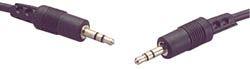 Common to all units is a kind of direct connection through a preamp jack either on the front or back of the unit, usually in the form of a 3.5mm stereo jack (the jack used on portable unit headphone outputs). Though somewhat uncommon, they are a better way of connection for the same reason as those described for the CD changer direct connection. A 3.5mm to 3.5mm stereo extension wire, that looks like a headphone wire with two male ends, is connected between the line out or headphone jack on the portable unit and the 3.5mm jack input on the head unit. This allows the signal from the portable unit to go directly to the preamp section of the head unit, giving the best signal practical.
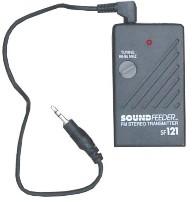 The third method is to buy a small battery powered FM transmitter for about $20. These work with both tape and CD players and are about the size of a deck of cards. The unit plugs into the line out or headphone jack of the portable unit and transmits a signal to the FM section of the radio at the frequency you choose (an unused section of the FM band). This unit is basically a small FM transmitter and its quality and effectiveness varies.Keep in mind that these are battery operated and will need frequent battery changes if they are not switched off every time the radio is turned off. iPod specific models often have built in chargers that plug directly into the cigarette lighter plug.
Adding an iPod™ to a Car Stereo System
Integrating an iPod™ into a car stereo system has become one of the most popular requests car audio installers get. The Apple iPod™ has become one of the most phenomenal electronic devices with a user base that is too big to ignore. There are now several ways to add an iPod™ to a car radio or car stereo system. Some are better than others and some are of course more expensive than others. We'll take a look at several of the units and methods available for adding an iPod™ to a car stereo system.
How to add an iPod™ to any car radio
The cheapest and easiest way to add an iPod™ to any car radio is through an FM transmitter or a cassette adapter (if you have a cassette player in your car). These are basically the same methods that were used to add a portable CD player to a car stereo system when CDs were first becoming popular.
The FM transmitter works like a small radio station, broadcasting the signal that is given to it (in this case by the iPod™) on an FM band. The range of the broadcast is very small but it's enough to get the signal into your radio antenna. The drawbacks to the FM transmitter are that sound quality will be only as good as the FM radio and you don't have any control over the iPod™ except through the front panel controls (which is dangerous while driving). Some models come with iPod™ charging systems that plug into your car's cigarette lighter which can be a nice feature on longer trips.
The cassette adapter works by converting the signal that is given by the iPod™ into a signal that can be read by the cassette head of a cassette player. The drawbacks to the cassette adapter are similar to that of the FM transmitter. In this case the sound quality will be only as good as the casette section of the stereo and you don't have any control over the iPod™ except through the front panel controls. And of course you have to have a cassette player in your car.
Another good option is the Harman Kardon Drive + Play (1 or 2) adapter, which is a non-current product and can be found on closeout quite inexpensively. Also the Kenwood KOS-A300, another discontinued product which can be had been available for $50 shipped from Crutchfield.These units work with any FM car radio using an FM modulator rather than a transmitter. They can also be connected directly to an RCA input on a head unit or even an amplifier if you wanted to have an iPod™ only based stereo system. There is an external display screen and an iPod™-esque control wheel. All power adapters are included so these are all inclusive units. These units are a very good buy for what you get, especially at these closeout prices.
Alpine made a similar unit, the ex-10, that included a Bluetooth hands free car kit. Like the second Drive + Play the Alpine unit has a color screen. This model has also been discontinued.
How to add an iPod™ to certain factory car stereos
A better but more expensive way to add an iPod™ to some factory car stereo systems is to buy a specialized adapter. There are several models available and generally your car stereo will need to be able to control a CD changer and/or satellite radio. Adapters are available for most factory stereo systems that have CD changer controls built in. Others are specific to certain manufacturers and models of car stereo head units. The upside to these adapters is that they allow you to control your iPod™ with the radio or steering wheel controls and most also display the iPod™ information on the radio's display.
Here are a few units that are currently available. Not all adapters are listed here and new models are always coming out. If there is a certain brand of head unit you are interested in contact the manufacturer and see what they offer.
How to add an iPod™ to aftermarket car stereos
Virtually every major aftermarket manufacturer now has an iPod™ interface device for their head units. This is true for new head units at least and some older head units also have adapters available. Rather than list every manufacturer that has an iPod™ adapter I'll just say visit the website of the manufacturer you are interested in to see what is needed for their head units. Some head units require external adapters, some require special interface cables and some allow the iPod™ to plug right into the unit using a standard iPod™ cable. There are several units that just use an iPod as the source, no CD or DVD capability at all. Weigh the costs versus the installation expense as well as the level of control the head unit gives you over the iPod™ while driving. You don't want to be taking your eyes off the road to scroll the iPod™ menu system.

You may also be interested in How to Install Your Own Car Stereo System . It covers many topics including in depth car audio amplifier installation. Click here.
Next Page ---> Mobile Video Systems